How to Install 9AM 3D Text UI (ox_lib override)
Install a free animated 3D text UI for FiveM with world-space prompts, ox_lib override support, and an export-based API. A five-minute polish upgrade for any server.

Interaction Prompts That Live in the World
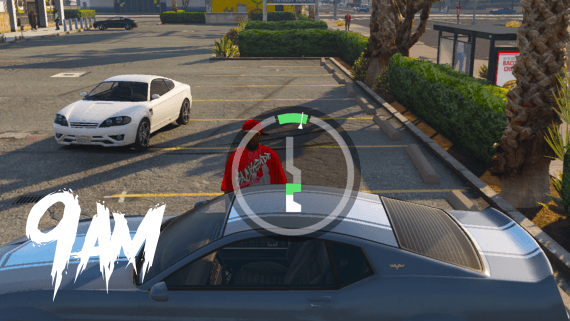
Every FiveM server is full of prompts. Press E to open the shop, press G to enter the garage. Almost all of them are flat overlays stuck to the edge of the screen, completely disconnected from the thing you're looking at.
9AM TextUI puts the prompt in the world instead. It renders at real 3D coordinates, and as you walk closer a small golden dot smoothly expands into the full prompt with the keybind. It's free, it's standalone, and it automatically overrides ox_lib's Text UI. That last part matters: every existing script on your server picks up the new look without a single code change.
What It Does
- 3D world prompts rendered at world coordinates with camera projection tracking
- A classic screen-anchored overlay mode when you want the traditional style
- Drop-in ox_lib override for
lib.showTextUIandlib.hideTextUI - Sphere, box, and poly zones via ox_lib
- Distance-based animation that expands up close and collapses into a dot at range
- A configurable accent color to match your server's branding
- Free and open source
It's also built with performance in mind. Pre-allocated NUI messages, screen-coordinate thresholds, and per-frame render deduplication keep resource usage minimal. It works on both GTA5 and RDR3.
Installation
The only dependency is ox_lib.
- Download the resource from the store page
- Extract it into
resources/as9am-textui - Add it after ox_lib in
server.cfg:
ensure ox_lib
ensure 9am-textui
Zones Without Writing Any Code
For static locations you don't need Lua at all. Define zones in config.lua:
Config.PrimaryColor = '#f7e472'

Config.Zones = {
  {
    id = 'management-menu',
    text = 'Open Management',
    key = 'E',
    coords = vec3(-34.9118, -1102.1649, 26.4224),
    displayDist = 10.0,
    nearDist = 2.0,
    offset = vec3(0.0, 0.0, -0.6),
  },
}
The two distances are what make the prompts feel alive. displayDist controls when the dot becomes visible, and nearDist controls when it expands into the full prompt with the keybind. Zones can be spheres (the default), boxes with size and rotation, or polygons with arbitrary vertices.
The ox_lib Override
This is the reason to install the script even on a server with hundreds of resources. The included override.lua replaces lib.showTextUI and lib.hideTextUI globally.
The recommended setup is adding it to ox_lib directly, which applies to every resource automatically. Add this to ox_lib's fxmanifest.lua:
files { '@9am-textui/override.lua' }
client_scripts { '@9am-textui/override.lua' }
If you'd rather roll it out gradually, add the same two lines to a single resource's fxmanifest.lua instead.
Either way, existing calls simply route through the new UI:
lib.showTextUI('[E] Interact')  -- now renders as animated 9am-textui
lib.hideTextUI()
lib.isTextUIOpen()
Your target scripts, shops, garages, and job resources all get the upgraded look with zero edits.
Dynamic Prompts via Exports
For anything driven by game state, use the exports:
-- Create a 3D world prompt
exports['9am-textui']:createTextUI('shop-door', {
  text = 'Open Shop',
  key = 'E',
  coords = vec3(250.0, -850.0, 29.5),
  displayDist = 10.0,
  nearDist = 2.0,
})

-- Update only what changed
exports['9am-textui']:updateTextUI('shop-door', { text = 'Closed' })

-- Remove it
exports['9am-textui']:removeTextUI('shop-door')
There's also a screen-space overlay API (showOverlayTextUI, hideOverlayTextUI, isOverlayTextUIOpen) for prompts that shouldn't be anchored to the world. The key hint is parsed from a [E] style prefix automatically.
A practical example, an ATM that can go out of service:
RegisterNetEvent('bank:client:toggleATM', function(enabled)
  if enabled then
    exports['9am-textui']:updateTextUI('atm_legion', { text = 'Use ATM', key = 'E' })
  else
    exports['9am-textui']:updateTextUI('atm_legion', { text = 'Out of Service', key = '' })
  end
end)
Tip: Remove your prompts in
onResourceStopso restarting a resource during development never leaves orphaned labels floating around the map.
Get It
It's free. If your server runs ox_lib, this is about the most visual polish you can add in five minutes. Install it, add the override, and every prompt on the server instantly looks current.
FiveM 3D Text UI
World-space animated prompts with automatic ox_lib override. Free, and installed in five minutes.
Full zone options and the API reference are in the TextUI documentation.