How to Install 9AM Lockpick (Standalone, QBCore, ESX)
A complete guide to installing and configuring a skill-based FiveM lockpick minigame with XP progression, difficulty presets, and drop-in exports for doors, vehicles, and heist content.
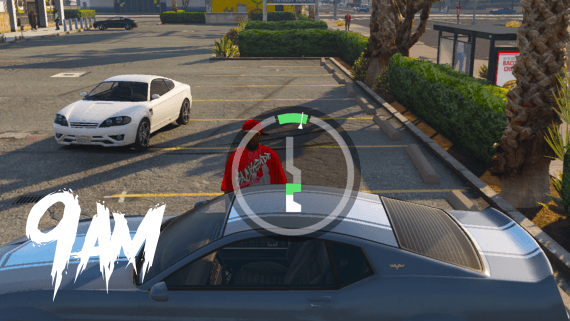
A Lockpick Minigame Players Actually Want to Master
Most lockpick scripts in FiveM boil down to the same thing. You press E, a circle spins, and you either win or you don't. It gets old fast, and nobody ever feels like they got better at it.
9AM Lockpick takes a different route. The minigame is inspired by Payday 3, so success comes down to timing and focus rather than luck. There's an XP system on top, which means players actually improve the more locks they pick. The script is standalone, the config is fully editable in both editions, and you get two simple exports to hook it into doors, vehicles, safes, or anything else.
This guide walks through installation, the config, difficulty tuning, and a few integration examples you can copy straight into your own resources.
Why a Skill-Based Lockpick Matters
Crime gameplay depends on how the small moments feel. If picking a lock is trivial, car theft turns into spam. If it's pure luck, players feel cheated when they fail. A skill-based minigame fixes both problems at once, and the XP progression gives your regulars a reason to keep practicing.
Here's what you're working with:
- A Payday 3 inspired minigame instead of a static skill check
- Level and XP system, with levels feeding into difficulty
- Standalone, so the minigame itself needs no framework
- The same editable
config.luain both escrow and open source editions - Two exports, one awaitable and one callback-based
Installation
Setup takes a couple of minutes.
- Download the resource from your Cfx.re Portal after purchase
- Extract it into your server's
resources/folder as9am-lockpick - Add it to your
server.cfg:
ensure 9am-lockpick
Make sure 9am-lockpick starts before any resource that calls its exports.
There are no framework bridges to install and no SQL to import. Player XP is saved automatically to levelData.json inside the resource.
Configuring XP, Levels, and Framework
Everything lives in config.lua. Escrow customers get the same editable config as open source buyers, so nothing here is locked away:
Config = {}

Config.EearnXpRatio = 250 -- XP awarded per successful lockpick
Config.Level2Xp = 4000    -- XP required for level 2
Config.Level3Xp = 8000    -- XP required for level 3

Config.Framework = 'qb'   -- 'qb', 'esx', or 'other'
With the default ratio, level 2 takes 16 successful picks and level 3 takes 32. If you want progression to be a long grind, raise the thresholds. If you'd rather players level up quickly, lower them.
On QBCore: leave Config.Framework = 'qb'. XP is stored against the citizenid, so it survives character switches and restarts.
On ESX: set Config.Framework = 'esx'. The script uses the player's license identifier through Config.GetPlayerIdentifier, and you can change that function if you need to:
Config.GetPlayerIdentifier = function(source)
    if Config.Framework == 'qb' then
        QBCore = exports['qb-core']:GetCoreObject()
        local Player = QBCore.Functions.GetPlayer(source)
        return Player.PlayerData.citizenid
    else
        return GetPlayerIdentifiers(source)[1]
    end
end
On a custom framework: set Config.Framework = 'other' and return any stable per-player ID from GetPlayerIdentifier. That's the only thing the XP system needs from you.
Using the Exports
There are two exports, and both award XP automatically on success.
The awaitable version returns a boolean:
local success = exports['9am-lockpick']:createLockpickGame(7, false, true)

if success then
    -- Unlock the door, give loot, etc.
else
    -- Break the lockpick item, alert cops, etc.
end
The callback version runs the same minigame and hands the result to a function:
exports['9am-lockpick']:createLockpickGameCb(7, false, true, function(success)
    if success then
        -- Unlock the door, give loot, etc.
    end
end)
The three parameters control difficulty:
| Parameter | Type | What it does |
|---|---|---|
speed | number | Pointer tick interval in ms. Lower is faster and harder. 7 is a good default |
isDecrease | boolean | When true, the progress bar drains over time. Hitting zero fails the attempt |
randomSpeed | boolean | When true, speed can change after successful hits for extra challenge |
Difficulty Presets
Don't use one global difficulty for everything. Tune the parameters per interaction:
-- Easy house door
exports['9am-lockpick']:createLockpickGame(10, false, false)

-- Standard vehicle
exports['9am-lockpick']:createLockpickGame(7, false, true)

-- Hard safe or high-tier door
exports['9am-lockpick']:createLockpickGame(4, true, true)
That way an easy car theft loop and a genuinely hard bank vault can live on the same server.
Integration Examples
Vehicle lockpicking:
RegisterCommand('pickvehicle', function()
    local ped = PlayerPedId()
    local vehicle = GetVehiclePedIsIn(ped, false)

    if vehicle == 0 then
        vehicle = GetClosestVehicle(GetEntityCoords(ped), 5.0, 0, 71)
    end

    if vehicle == 0 then
        return
    end

    local success = exports['9am-lockpick']:createLockpickGame(7, false, true)
    if success then
        SetVehicleDoorsLocked(vehicle, 1)
        SetVehicleDoorsLockedForAllPlayers(vehicle, false)
    end
end)
For item-based triggers on QBCore, call the export from your inventory's item use handler and keep the item removal and reward logic in your own resource:
exports['9am-lockpick']:createLockpickGameCb(8, false, true, function(success)
    if success then
        TriggerServerEvent('my-crime:server:lockpickSuccess')
    else
        TriggerServerEvent('my-crime:server:lockpickFailed')
    end
end)
Tip: The docs include ready-made test commands for development. Remove them or lock them behind permissions before going live.
Escrow or Open Source?
Both editions run the same minigame with the same config and exports, so integrations work identically. The open source edition adds the full client and UI source, which matters if you want to reskin the minigame or fork its behavior. If you just want to install it and tune the difficulty, escrow does the job.
Get Started
A lockpick script is a small resource, but it sits inside every robbery, every car theft, and every heist on your server. Making that moment skill-based changes how all of them feel.
FiveM Lockpick Script
Skill-based lockpick minigame with XP levels and drop-in exports. Available in escrow and open source editions.
For the full API reference, see the lockpick documentation.